Your restaurant clients don't need better bookkeeping. They need better numbers.

Foodrazor turns every invoice into a draft journal entry in Xero or QuickBooks — and a live operational dashboard for your client. One action. Two outputs. Done once, not twice.

See How It Works
app.foodrazor.com/reports/menu-margins
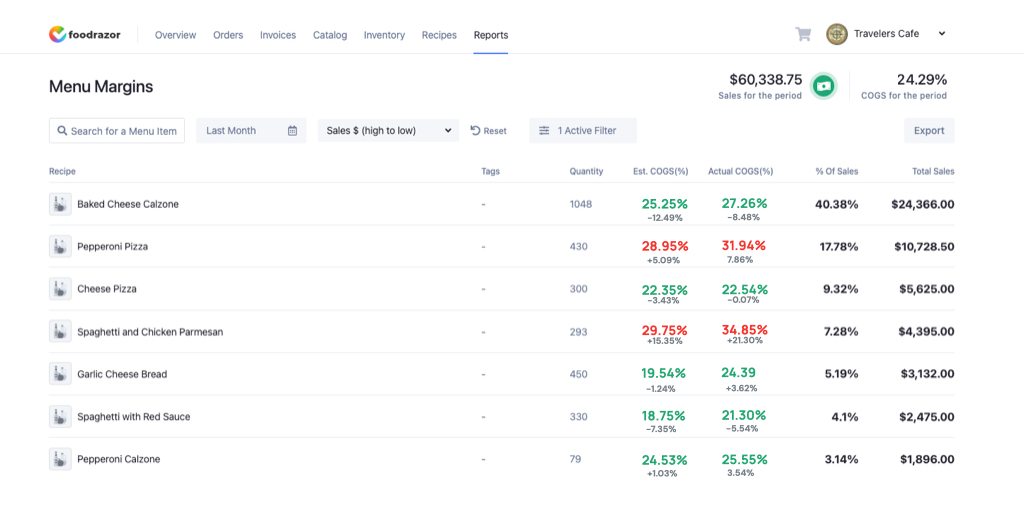
Foodrazor Menu Margins report showing estimated vs actual COGS and profit per dish
The part nobody bills for

Restaurant clients are terrible at sending invoices.

The delivery shows up, the docket goes in a drawer, and the photo you needed is sitting in a chef's camera roll under three hundred pictures of plated food. You can't close what you can't see.

So you send the reminder email. Then the second one. Then the gentle nudge to the owner who's slammed on a Friday service and hasn't read a single one of them.

And when the box of crumpled paper finally lands the week after month-end, you're the one who has to ask — again — why half of it is missing.

That's not accounting. That's babysitting.

The real problem

Your numbers arrive too late to matter, so operators don't wait for them.

Most operators run two sets of books: the official Xero file, and a spreadsheet on someone's laptop full of estimates. Those two numbers have never once agreed. Foodrazor makes the spreadsheet redundant — one source of truth, one action, two outputs.

Operator's Excelguesswork
ItemCostGP%
12Beef ribs~30.00???
13Salmon (est.)18.0061%
14Olive oil 5L58 -ish
15TomatoesMISSING??
costings_FINAL_v7_USE_THIS.xlsx · last saved 6 weeks ago
replaced by
Foodrazor · Live Costlive · accurate
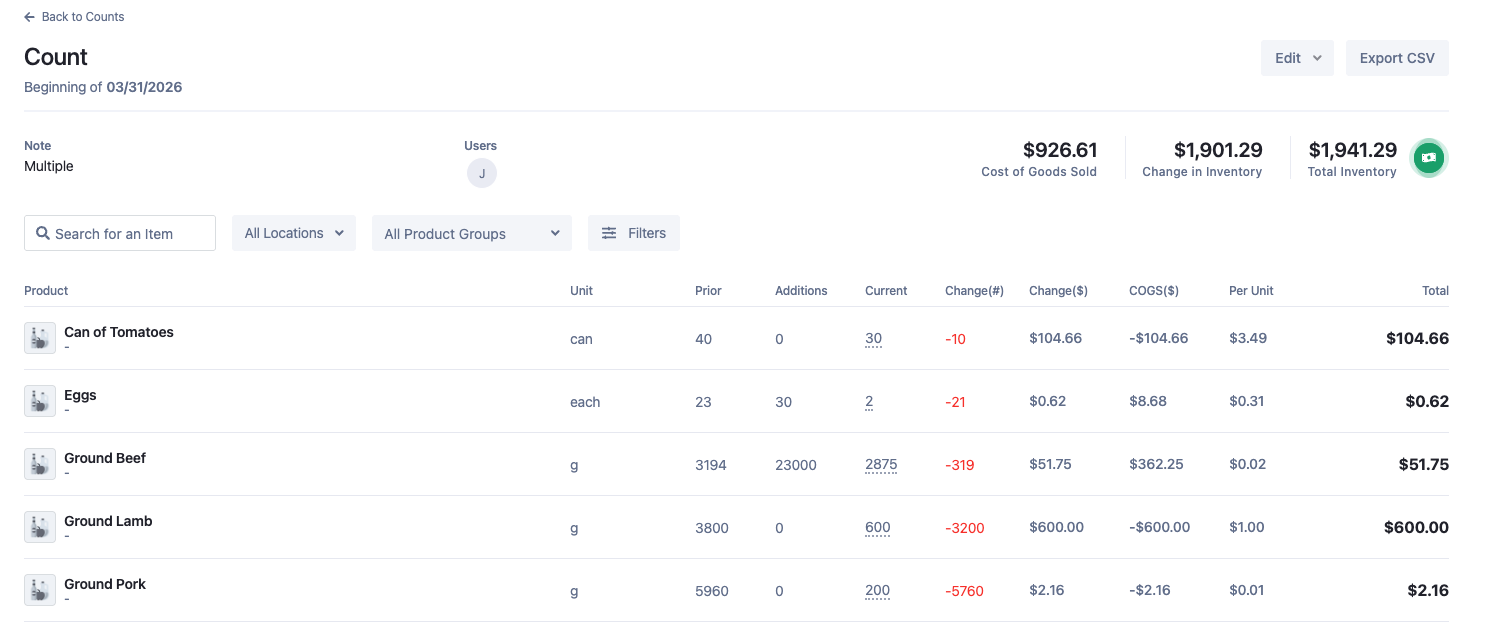
Foodrazor inventory count showing real per-unit cost and COGS for every ingredient
One source of truth

Stop reconciling two sets of books. Start from one.

See what it looks like when your clients' Xero file and their real food costs are finally the same number.

Schedule a Call
How it works

One photo in. Two clean outputs out.

1

Your client photographs the invoice.

That's their whole job. A photo from the floor, a forwarded email, or a PDF — no app to learn, no data entry, no portal to log into.

2

Foodrazor extracts every line item.

AI reads each line — product, unit, quantity, price — with human review on every page. Not a total and an image: the actual detail.

3

You review. Your client sees the scoreboard.

A draft journal entry lands in Xero or QuickBooks for you to approve. Your client gets a live COGS dashboard. Review, approve, done.

Two outputs · one action

One photo from your client. One draft journal entry for you. Nothing in between.

What this means for your practice

Stop being the person who asks twice.

Same portfolio, less time

The chasing, keying and reconciling that ate your week simply isn't there anymore. The work shrinks; the client list doesn't have to.

Books close faster, no chasing

Invoices arrive coded and complete as they happen — not in a crumpled box after month-end. The close stops waiting on a drawer.

Calls about strategy, not status

When the numbers are always current, clients stop asking "are they done yet?" and start asking "what should I do about this?"

Some of our accounting partners have taken on additional restaurant clients with the same hours. Others just go home earlier. Both are good outcomes.

The bigger picture

The best thing you can do for a restaurant client isn't cleaner books. It's a scoreboard they can read.

Restaurants fail because operators didn't know their numbers until it was too late to act. Foodrazor gives your clients real-time food cost visibility — in the language of their business, not the language of their accountant. That makes you the advisor who got them there.

app.foodrazor.com
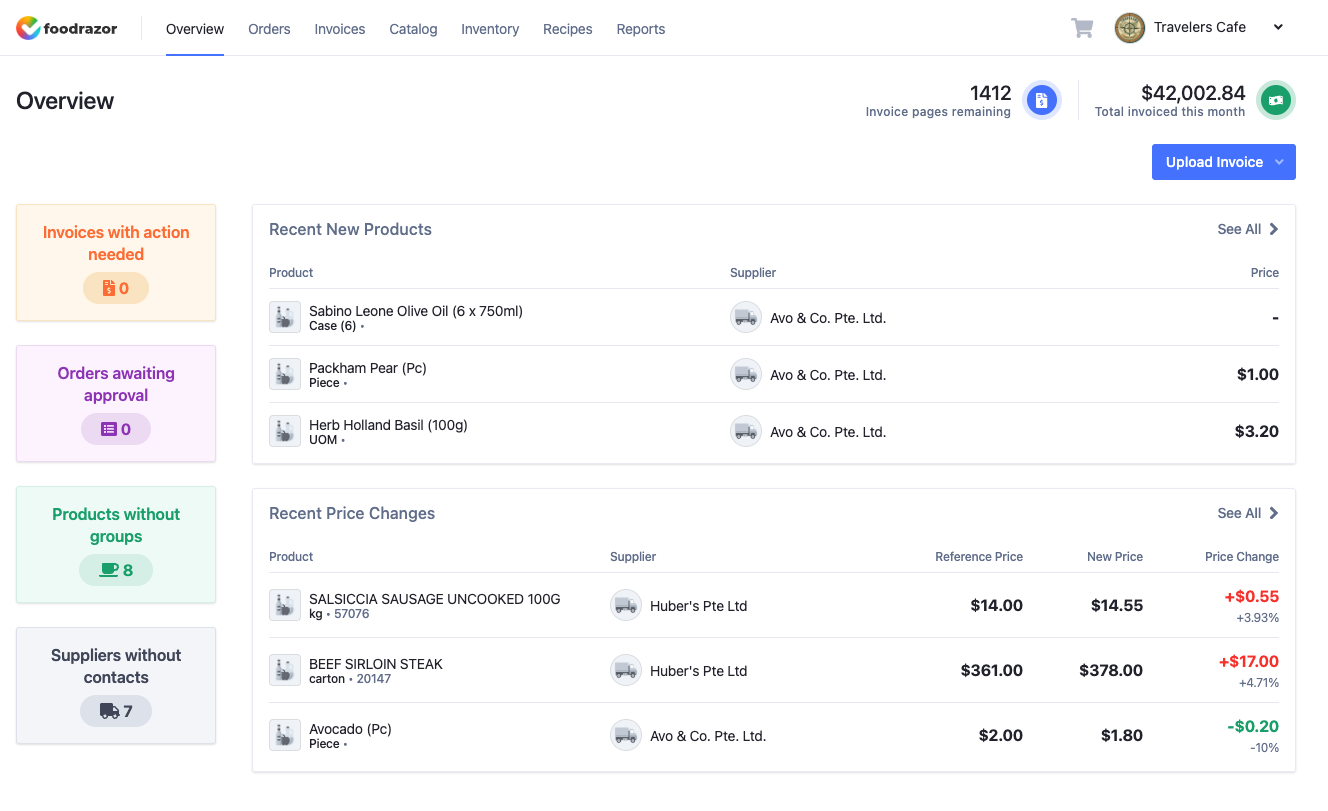
Foodrazor overview dashboard showing invoice queue, recent products and live supplier price changes
Compare to other accounting tools

Keep them for your general clients. Switch your restaurants to Foodrazor.

Dext and HubDoc capture documents and push clean journal entries — exactly right for most of your portfolio. For restaurant clients, the same invoice should be doing more than feeding a journal entry. Here's how they compare.

Schedule a call

See what your restaurant clients' numbers could look like.

A 30-minute demo. We'll show you how Foodrazor works with Xero and QuickBooks, and exactly what onboarding looks like for your clients.

Schedule a Call